Turn ServiceNow into your all-in-one contact hub

Diabolocom brings voice and CRM together so every call starts faster, runs smoother, and ends with a satisfied customer.

A unified agent experience

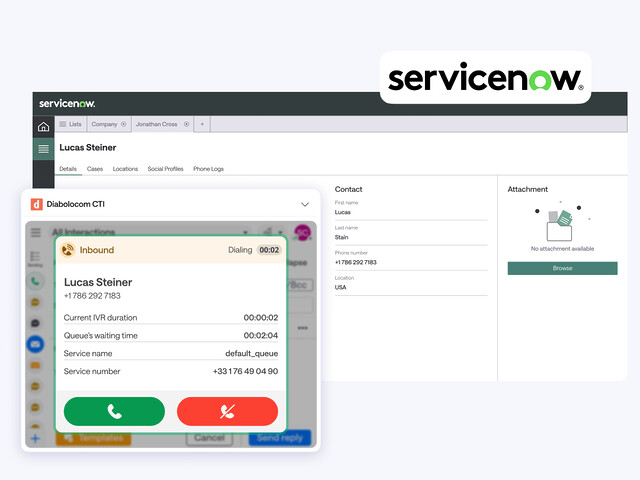
Work where your data lives. Diabolocom’s ServiceNow CTI keeps agents in one clean workspace—no juggling tabs, no lost context.

With one click, agents answer calls, view records, and see full history from the very first ring. One screen, one workflow, one smooth experience for everyone.

Process automation and increased productivity

Work where your data lives. Diabolocom’s ServiceNow CTI keeps agents in one clean workspace—no juggling tabs, no lost context.

With one click, agents answer calls, view records, and see full history from the very first ring. One screen, one workflow, one smooth experience for everyone.

Category

CRM

Why teams choose Diabolocom for ServiceNow

Up and running in minutes, only clicks away

Set up Diabolocom’s ServiceNow CTI integration in record time. With no complex development required, your teams are up and running instantly in a ready-to-use environment.

All your call tools, all in one place

Answer, transfer, record, and conference without leaving ServiceNow. Every control is built in so agents can focus on customers, not systems.

Built in, not bolted on

Diabolocom lives natively in ServiceNow. Calls sync in real time, tickets update automatically, and reports stay accurate—smooth for agents, seamless for customers.

Boost your team’s productivity

With complete visibility into every past interaction, your sales and customer service teams save valuable time and can focus on delivering an exceptional customer experience. The ServiceNow CTI integration enables them to handle more calls in less time, access detailed customer histories instantly, and personalize each exchange with greater accuracy.

The result: faster response times, stronger relationships, higher sales, and optimized productivity.

Reduce Your Costs

Activate CTI integration with ServiceNow and benefit from a modern cloud telephony system that simplifies call management while reducing operational expenses. By automating repetitive tasks and centralizing communication tools, your teams gain efficiency, consistency, and visibility across every channel.

This integration helps lower infrastructure costs and offers an agile, scalable, and sustainable alternative to traditional telephony systems.

Get Access to Key Telephony Features with our ServiceNow CTI Integration

Incoming call recognition

Know who’s calling before hello. Agents can view all customer details, including interaction history. This allows your sales team to dedicate more time to resolving the issue.

Call history

Every inbound and outbound call is automatically logged in the contact record through ServiceNow CTI. You can access the call recording directly via the saved URL link.

Click-to-call

Your sales teams can place calls with a single click. No more dialing multiple numbers or copy-pasting them into fields. With this feature, your agents can work more productively.

Intelligent CRM-based routing

All the data required to route, distribute, and redirect calls is stored in your ServiceNow CRM.

Automatic call forwarding

Once ServiceNow is integrated, VIP customers who have already contacted your support are automatically redirected to a designated agent.

Native integration

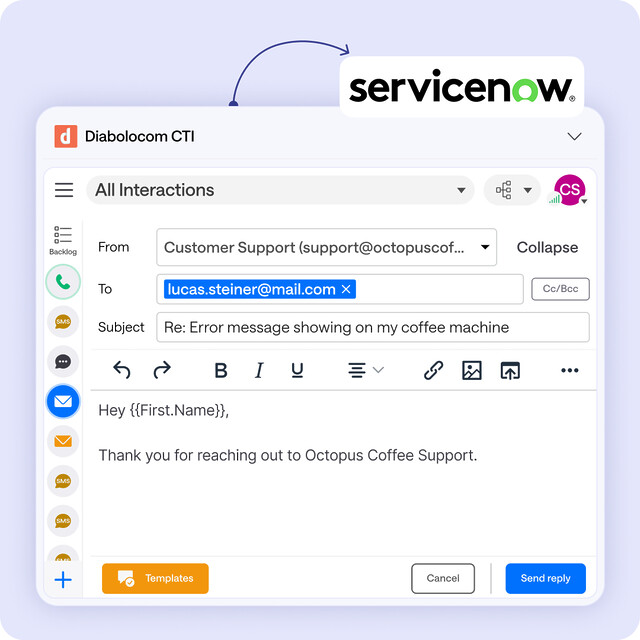
Diabolocom is available via a widget embedded directly in your ServiceNow CRM interface. Your sales teams have all the professional tools they need within a single workspace.

Frequently asked questions

What is a ServiceNow CTI integration?

A ServiceNow CTI integration connects the Now Platform with other systems to ensure smooth data flow without interruptions. It streamlines workflows and enhances the user experience, allowing employees to focus on their work instead of the technology.

What types of integrations are available with ServiceNow?

ServiceNow offers three main types of integration:

– Process integration: Transfers data between systems and optimizes workflows.
– User interface integration: Displays different types of information on the same page.
– Data integration: Securely shares data across teams.

What types of connectors does ServiceNow support?

ServiceNow supports a wide range of technologies, including web services, REST and SOAP, JDBC, LDAP, CSV/Excel files, email, and more.

What should you prepare before starting a ServiceNow integration?

Before starting a ServiceNow integration, it’s important to clarify your goals. Begin by identifying the exact integration requirements, such as which systems need to be connected and what data should be exchanged. Then, involve key stakeholders like security and architecture teams to make sure the project aligns with internal standards. Finally, review the quality of your existing data so you can address any gaps or inconsistencies before the integration goes live.

What integration methods does ServiceNow provide?

ServiceNow provides three methods of integration. The ServiceNow Store offers ready-to-use integrations developed by ServiceNow or its partners. The Integration Hub helps automate processes with predefined spokes. Finally, custom integrations allow you to build tailored solutions for specific business needs.

Why is integrating with ServiceNow important?

Integration automates routine tasks, makes workflows more efficient, and improves the overall user experience, helping organizations save both time and effort.

Discover the ServiceNow Integration with Diabolocom now