Microsoft Dynamics CTI Integration

Boost your sales and customer service teams’ productivity with computer telephony integration (CTI) directly embedded in Microsoft Dynamics 365.

Integrate Diabolocom’s phone system with Microsoft Dynamics

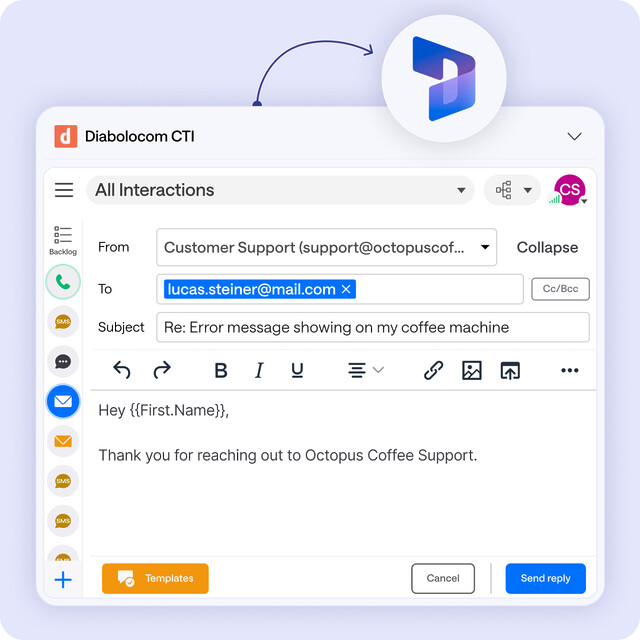
Make and take calls right inside Microsoft Dynamics with Diabolocom. No app switching, no extra tabs. Reps keep customer details on screen while they talk, with crystal-clear audio and ultra-low latency.

Centralize all your customer interactions

All conversation and context in one view. Diabolocom turns Microsoft Dynamics into your contact center with click to call, screen pop, and auto logging. No tab hopping, no copy paste. Agents get instant context, faster wrap up, and happier customers.
Category

CTA

Boost performance with our Microsoft Teams phone integration

A unified interface for calls and data

With Microsoft Dynamics phone integration, manage all calls and customer data from a single interface. Your teams access real-time information, work more efficiently, and deliver a consistent, seamless experience for every customer.

Automated ticketing

Every call becomes a case in Microsoft Dynamics. Details log automatically, ownership and tasks are set, and reminders keep follow-up on time. Less admin for agents, faster resolutions for customers, zero missed cases.

Real-time sync across phone and CRM

Real-time sync between calls and Microsoft Dynamics keeps records accurate. Notes, outcomes, and dispositions update automatically, so sales and support see the same story. No double entry, no stale data, better reporting and follow-up.

Help your agents work faster

With Microsoft Dynamics phone integration, your agents can handle calls more efficiently while offering a smoother customer experience. Caller details and history appear instantly on screen, ensuring personalized and informed interactions. Real-time synchronization keeps data consistent, while automation removes repetitive tasks.

By connecting telephony and CRM, Diabolocom enhances productivity and reduces handling time.

Access real-time call analytics

Diabolocom’s MS Dynamics integration brings complete visibility into your call activity directly within your CRM. Every conversation, performance metric, and customer interaction is updated automatically, giving your teams instant access to relevant insights.

Track volumes, monitor quality, and identify trends through intuitive dashboards to continuously improve efficiency and customer satisfaction.

Key features of our Microsoft Dynamics integration

Incoming call recognition

When a call comes in, the customer record automatically opens in Microsoft Dynamics. The agent instantly sees key information to respond faster and deliver smooth, personalized service.

Call history

All calls are logged in Microsoft Dynamics, with direct access to recordings for clear, centralized tracking of every customer interaction.

Click-to-call

Agents can start outbound calls with just one click. No more dialing or copy-pasting numbers—your teams become more productive with the Microsoft Dynamics 365 phone integration.

Smart routing powered by Microsoft Dynamics CRM

All data from your Microsoft Dynamics CRM is used to prioritize, classify, and route calls. For example, high-value customers can be automatically redirected to a dedicated agent.

Self-service automation

With MS Dynamics phone integration, CRM data powers voice-based automation for simple requests—so your agents can focus on high-value calls.

Frequently Asked Questions

How does Microsoft Dynamics integration improve call management?

Thanks to automatic call recognition, agents instantly see the associated customer record. Calls are logged, recorded, and easily accessible. Features like click-to-call and smart routing shorten handling times and make every interaction more efficient.

Does Microsoft Dynamics integration automate certain tasks?

Yes. Microsoft Dynamics phone integration automates ticket creation and assignment, CRM data updates, and simple requests through Diabolocom’s self-service and voice automation features. This allows your agents to focus on complex, high-value conversations.

What data is synchronized between Diabolocom and Microsoft Dynamics?

All call data—incoming, outgoing, durations, recordings, and comments—is automatically synced with Microsoft Dynamics CRM. This real-time update ensures complete call history, better traceability, and a 360° customer view across your entire organization.

Is Microsoft Dynamics integration easy to set up?

Yes. Diabolocom’s Microsoft Dynamics CTI phone integration is designed for quick deployment with no complex development. Our experts support your administrators every step of the way to ensure a smooth, secure setup perfectly aligned with your internal processes.

Discover Microsoft Dynamics Integration with Diabolocom